Coding Coach
Human-in-the-loop coding coach that uses retrieval and a hint ladder to coach problem-solving without instantly revealing the solution.
- Last significant update
- Feb 2026
- Status
- Shipped
- Tech
- Python, LangGraph, Chroma, Ollama, Ruff, Mypy
- Links
- Repository
Overview
Coding Coach is an agentic CLI-based coding coach built with LangGraph to help users practice problem-solving in a more interactive, human-in-the-loop way. Users submit a coding problem, write their own solution attempt, and receive progressively stronger coaching only when needed, ranging from high-level conceptual guidance to a full solution. The system combines retrieval-augmented guidance, including algorithm knowledge cards and relevant PEP excerpts, with automated tooling feedback from ruff and mypy to reinforce both algorithmic thinking and code quality.
The idea came from a class discussion about how many coding practice platforms are strong at testing solutions, but less focused on helping users learn how to think through the problem-solving process itself. I wanted to explore whether an agentic workflow could behave more like a coach than an answer generator.
This project was also my first attempt at building an agentic application after learning the fundamentals through short courses on DeepLearning.AI, so part of the goal was to apply those ideas in a concrete end-to-end system.
Demo
Short walkthrough of the interactive coaching loop: problem → attempt → feedback → next action.
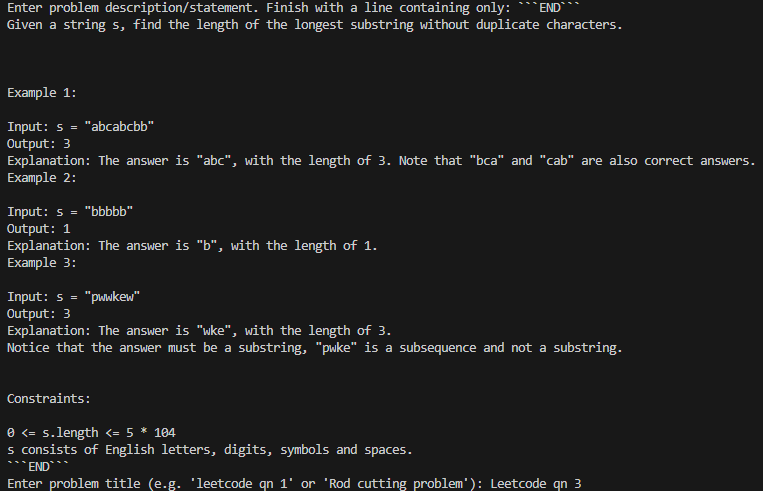
This example uses LeetCode #3, Longest Substring Without Repeating Characters, because it is a common problem where a correct solution can still be improved significantly in time complexity.
1) Provide the problem
The session begins by pasting the problem statement and providing a title or identifier.
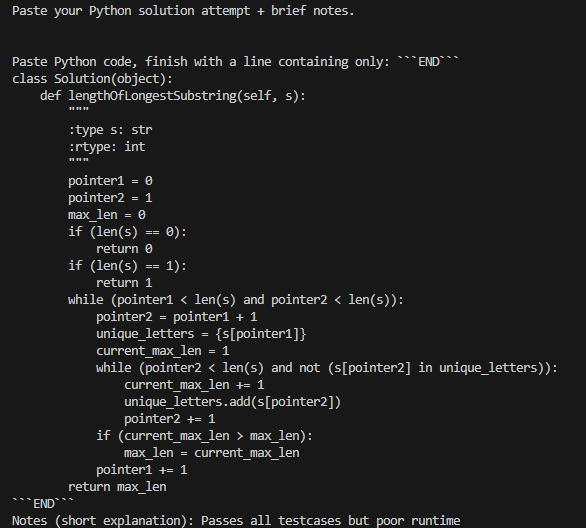
2) Submit an attempt
Next, the user submits a Python solution attempt, along with brief notes. This is where the human-in-the-loop agentic workflow begins.
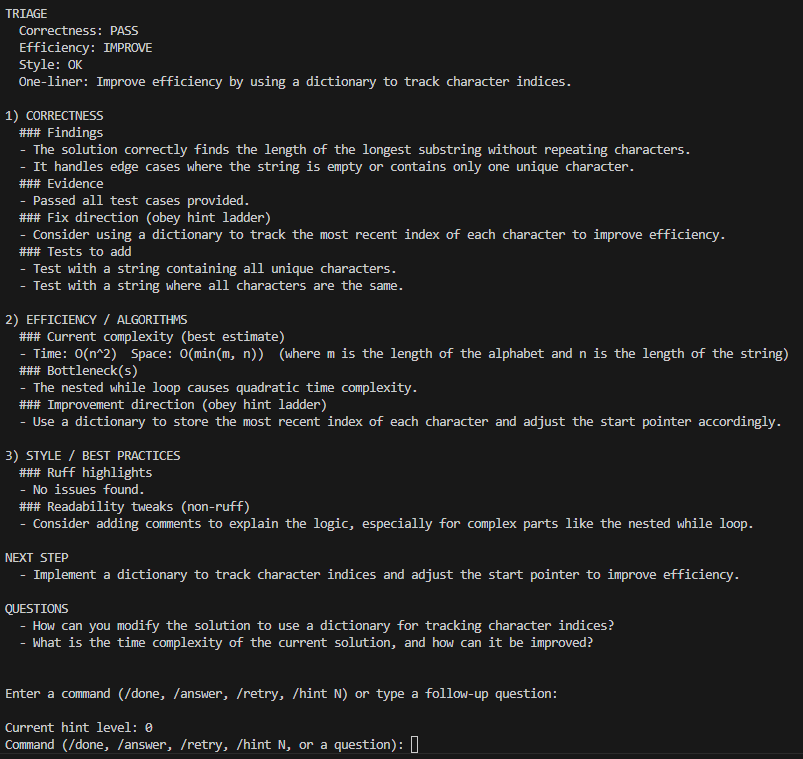
3) Receive structured feedback (Hint level 0)
At hint level 0, the coach provides conceptual guidance only, with no code or pseudocode.
The output is structured into:
- TRIAGE: A quick snapshot of correctness, efficiency, and style, along with a one-line recommendation
- CORRECTNESS / EFFICIENCY / STYLE: Findings, bottlenecks, and fix direction
- NEXT STEP: The single best action to take next
- QUESTIONS: Suggested follow-up questions to continue the learning loop
4) Continue the loop (commands or questions)
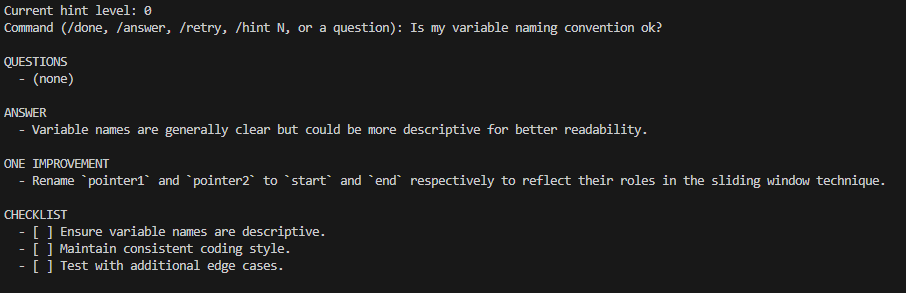
From here, the user controls the session:
/done: End the session/retry: Submit a revised attempt/hint N: Set hint level from 0 to 5/answer: Jump to full-solution mode at level 5- Any other input is treated as a follow-up question
Example: the user asks a style question about naming.
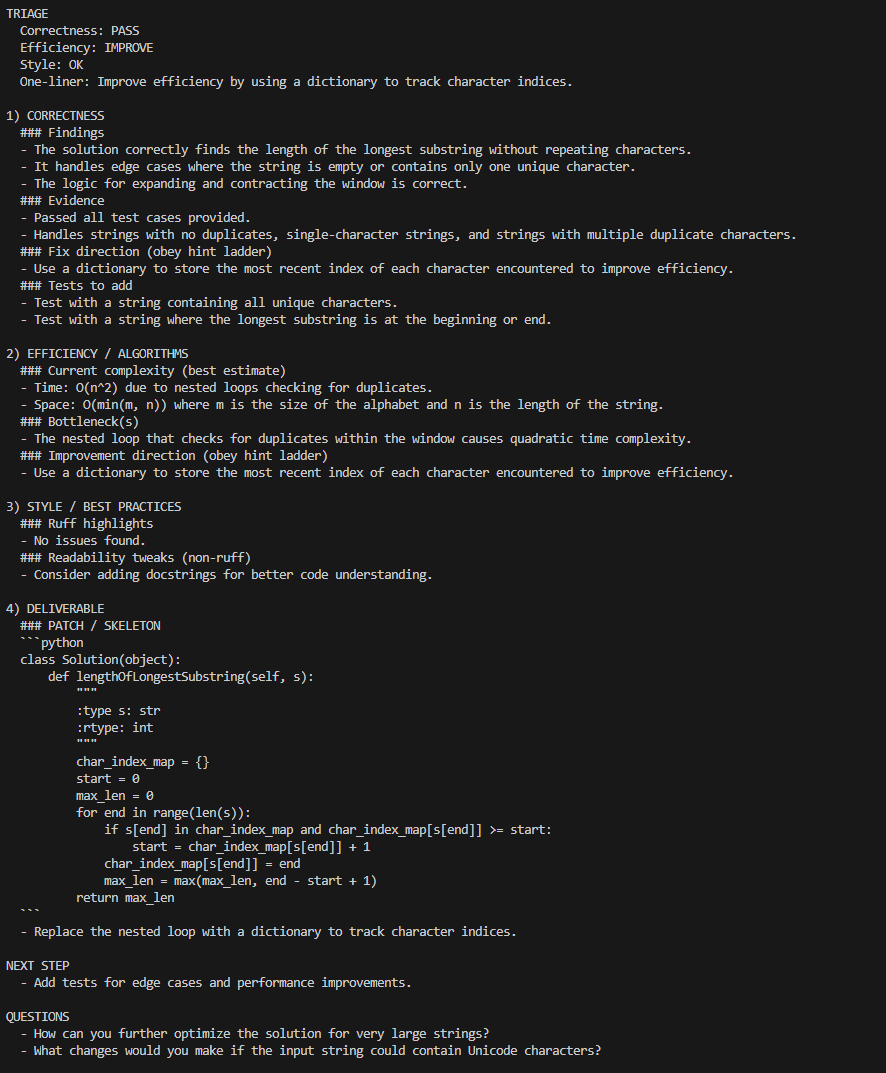
5) Request more direct guidance (Hint level 4)
After raising the hint level to 4, the coach provides a patch or skeleton that shows the key implementation idea, while still avoiding a pure copy-paste answer. In this case, it demonstrates replacing the quadratic nested loop with an index map for a linear-time sliding window solution.
6) Request the full solution (Hint level 5)
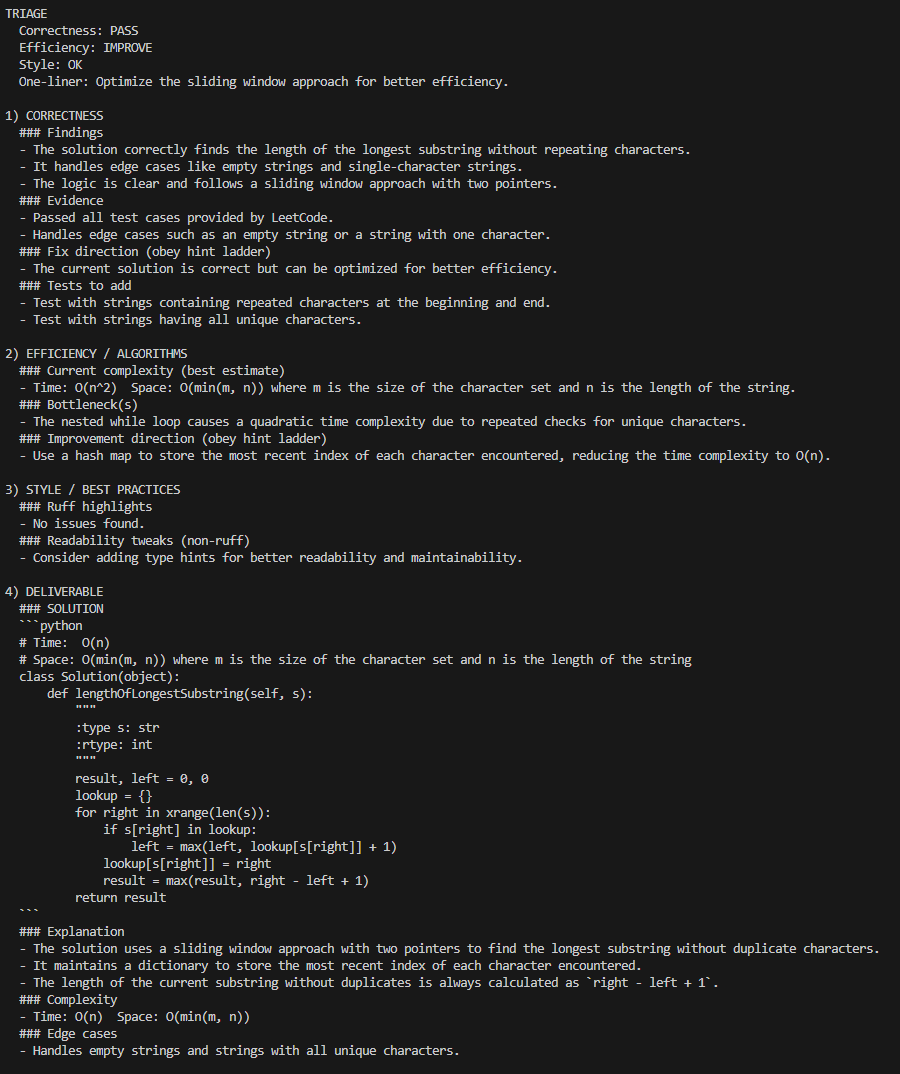
If the user is stuck, /answer moves to hint level 5, which provides a complete solution along with explanation, complexity, and edge cases.
What I built
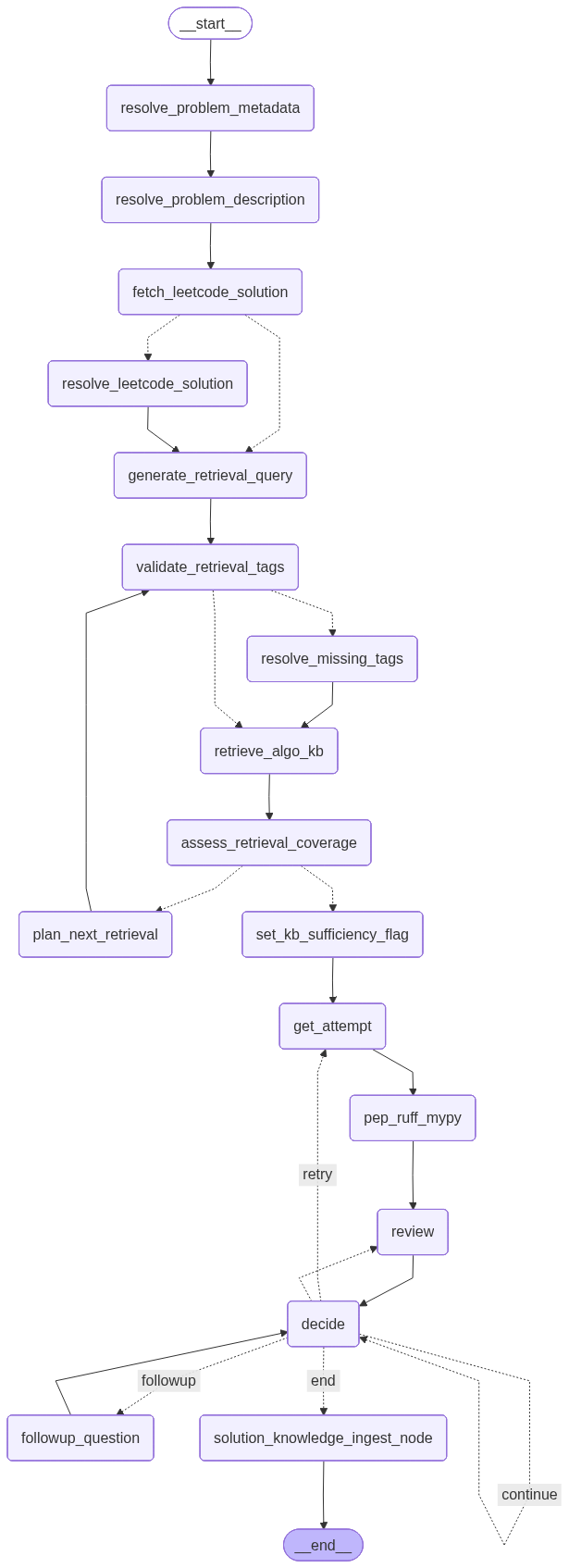
- LangGraph coaching workflow: Built a LangGraph workflow that orchestrates problem setup, retrieval, the interactive coaching loop, and optional solution ingestion.
- Hint ladder: Designed a hint ladder from levels 0 to 5 that controls how much help the coach provides, ranging from strategy-only guidance to a full working solution.
- RAG pipeline: Built a retrieval pipeline using a persistent Chroma vector store populated with structured algorithm knowledge base cards, plus an in-memory store for PEP 8 and PEP 257 excerpts.
- Human-in-the-loop CLI: Implemented a CLI with interrupt and resume behavior, along with session commands such as
/hint,/retry,/answer, and/done. - Tooling feedback stage: Added a feedback stage that runs
ruffandmypy, then retrieves relevant PEP references based on the findings. - Solution ingestion pipeline: Built a pipeline that, when a reference solution exists, distills that solution into reusable knowledge chunks and inserts them into the persistent knowledge base for future retrieval.
Key decisions
- Design for human-in-the-loop coaching: I optimized for learning rather than just answering, so users must submit an attempt before receiving structured feedback.
- Enforce a hint ladder: Explicit hint levels help prevent solution dumping and allow learners to control how much assistance they want.
- Use a two-store retrieval setup: I used persistent Chroma storage for evolving algorithm knowledge and an in-memory store for static PEP reference material. This keeps runtime simple while avoiding pollution of the persistent knowledge base.
- Integrate tooling and style feedback: Combining
ruffandmypyfindings with targeted PEP excerpts encourages professional Python practices alongside algorithmic thinking. - Accept local model tradeoffs: Using a local model through Ollama keeps cost at zero, but it also means outputs can be weaker than those from hosted APIs. That tradeoff was acceptable because my goal was to validate the agentic workflow and coaching loop rather than optimize for raw model capability.
Constraints & limitations
- Local model quality and latency constraints: Using a lightweight local model means outputs can sometimes be weaker or less consistent than hosted LLMs, and some steps can be slower. These issues do not break the workflow, but they can reduce the consistency of the coaching output.
- Limited platform coverage: Reference and optimal solution retrieval currently support LeetCode only. Instead of scraping coding platforms, which is often restricted by terms of service, I use a stable public source,
kamyu104's LeetCode-SolutionsGitHub repository, as the reference solution source. I initially explored search-based retrieval such as DuckDuckGo, but results were inconsistent and often failed to surface a reliable solution. Using a curated repository provides more predictable coverage and keeps the project focused on the coaching workflow rather than brittle data acquisition. - Retrieval quality depends on knowledge base coverage: RAG performance is only as strong as the underlying knowledge base documents and tagging consistency. The current baseline uses algorithms from
thealgorithms-python, split into knowledge chunks, along with reference solutions collected from prior runs.
Setbacks / lessons learned
- Standardizing the knowledge base is essential: The biggest lesson was that a RAG system is only as good as its stored documents. If knowledge cards are not consistent in structure and metadata, the database becomes noisy and retrieval becomes unreliable. I had to define a strict document schema, including fields such as when to use, pitfalls, and complexity, so chunks remain comparable and predictable, and so downstream prompting can reliably extract the same kinds of information from every document.
- Normalization matters more than it first appears: Without normalization, the knowledge base can accumulate multiple representations of the same concept, such as
dynamic-programming,dynamic programming, anddp, which reduces recall and makes filters unreliable. I learned to treat tags as a controlled vocabulary by validating against known tags, normalizing them to canonical forms, and applying fallback resolution such as fuzzy matching so both stored documents and incoming queries use the same language. - Context window management requires deliberate selection: Knowledge cards are dense, and pairing them with extra context such as a reference solution can quickly exceed prompt limits. Simply passing full chunks or trimming by token or character length often discards the most useful sections, which can reduce feedback quality. A better approach is to extract the most relevant parts of each chunk, such as summary, key ideas, and pitfalls, and compose a targeted context bundle so the model sees high-signal information rather than a long, partially truncated prompt.
- Helpful feedback needs structure: Without a strict hint ladder, the system tends to either over-help or miss certain types of feedback that are useful, such as pointing out pitfalls or edge cases the user failed to consider. The level system made the experience more consistent and more learner-controlled.
Future considerations
- Expand platform coverage beyond LeetCode by making reference-solution ingestion source-agnostic.
- Explore multi-agent specialization, such as a concept-only knowledge base agent, a similarity-hint agent, and a solution-aware hint agent, to improve consistency and reduce prompt overload.
- Add progress-aware coaching by comparing attempts across a session to highlight improvements.
- Improve RAG precision through better tag normalization, chunking, excerpt selection, and reranking.
- Evaluate stronger hosted models against local Ollama to quantify quality and latency gains.
- Add a fallback path that generates a baseline solution when no reference solution exists.
- Improve the UI.